%20scale(0.100000,-0.100000)'%20fill='%23000000'%20stroke='%23000000'%20stroke-width='34'%20stroke-linecap='round'%20stroke-linejoin='round'%3e%3cpath%20d='M733%20773%20c9%20-2%2023%20-2%2030%200%206%203%20-1%205%20-18%205%20-16%200%20-22%20-2%20-12%20-5z'/%3e%3cpath%20d='M640%20717%20c-30%20-24%20-62%20-52%20-70%20-63%20-8%20-10%208%200%2035%2023%2028%2023%2061%2051%2075%2062%2014%2011%2023%2020%2020%2021%20-3%200%20-30%20-19%20-60%20-43z'/%3e%3cpath%20d='M786%20747%20c3%20-10%209%20-15%2012%20-12%203%203%200%2011%20-7%2018%20-10%209%20-11%208%20-5%20-6z'/%3e%3cpath%20d='M734%20678%20l-19%20-23%2023%2019%20c21%2018%2027%2026%2019%2026%20-2%200%20-12%20-10%20-23%20-22z'/%3e%3cpath%20d='M684%20638%20l-19%20-23%2023%2019%20c21%2018%2027%2026%2019%2026%20-2%200%20-12%20-10%20-23%20-22z'/%3e%3cpath%20d='M550%20619%20c0%20-5%205%20-7%2010%20-4%206%203%2010%208%2010%2011%200%202%20-4%204%20-10%204%20-5%200%20-10%20-5%20-10%20-11z'/%3e%3cpath%20d='M593%20619%20c9%20-5%2017%20-17%2017%20-24%200%20-21%2014%20-18%2036%208%2019%2022%2019%2022%20-1%205%20-20%20-16%20-21%20-16%20-33%202%20-7%2011%20-18%2020%20-25%2020%20-6%200%20-4%20-5%206%20-11z'/%3e%3cpath%20d='M514%20588%20l-19%20-23%2023%2019%20c21%2018%2027%2026%2019%2026%20-2%200%20-12%20-10%20-23%20-22z'/%3e%3cpath%20d='M574%20558%20l-19%20-23%2023%2019%20c21%2018%2027%2026%2019%2026%20-2%200%20-12%20-10%20-23%20-22z'/%3e%3cpath%20d='M470%20555%20c-7%20-9%20-11%20-17%20-9%20-20%203%20-2%2010%205%2017%2015%2014%2024%2010%2026%20-8%205z'/%3e%3cpath%20d='M529%20523%20c-13%20-16%20-12%20-17%204%20-4%2016%2013%2021%2021%2013%2021%20-2%200%20-10%20-8%20-17%20-17z'/%3e%3cpath%20d='M378%20513%20c7%20-3%2016%20-2%2019%201%204%203%20-2%206%20-13%205%20-11%200%20-14%20-3%20-6%20-6z'/%3e%3cpath%20d='M451%20507%20c-1%20-12%20-5%20-16%20-13%20-11%20-10%206%20-10%205%20-1%20-8%207%20-8%209%20-19%205%20-23%20-4%20-5%20-1%20-5%206%20-1%2014%209%2017%20-20%202%20-29%20-5%20-3%20-10%20-13%20-10%20-21%200%20-21%2034%20-17%2055%206%2014%2015%2021%2017%2031%209%208%20-6%2011%20-15%208%20-20%20-3%20-5%201%20-9%209%20-9%2019%200%2046%20-32%2057%20-66%207%20-26%208%20-26%209%20-6%201%2014%20-17%2042%20-46%2073%20l-46%2049%20-22%20-20%20c-20%20-18%20-45%20-27%20-45%20-15%200%203%205%2013%2011%2023%207%2012%208%2028%201%2052%20-6%2019%20-11%2027%20-11%2017z'/%3e%3cpath%20d='M277%20461%20c-23%20-22%20-57%20-61%20-76%20-88%20l-33%20-48%2033%2040%20c18%2022%2055%2061%2081%2088%2058%2057%2054%2063%20-5%208z'/%3e%3cpath%20d='M420%20386%20c0%20-9%205%20-16%2010%20-16%206%200%2010%204%2010%209%200%206%20-4%2013%20-10%2016%20-5%203%20-10%20-1%20-10%20-9z'/%3e%3cpath%20d='M132%20278%20c-36%20-54%20-44%20-68%20-39%20-68%202%200%2021%2025%2041%2055%2020%2030%2034%2055%2032%2055%20-3%200%20-18%20-19%20-34%20-42z'/%3e%3cpath%20d='M544%20238%20l-29%20-33%2033%2029%20c17%2017%2032%2031%2032%2033%200%208%20-8%201%20-36%20-29z'/%3e%3cpath%20d='M480%20190%20c-14%20-11%20-56%20-31%20-93%20-46%20-38%20-14%20-66%20-28%20-64%20-30%207%20-8%20133%2047%20162%2071%2036%2029%2031%2033%20-5%205z'/%3e%3cpath%20d='M56%20145%20c-3%20-9%20-6%20-22%20-5%20-28%200%20-7%205%20-1%2010%2012%205%2013%208%2026%205%2028%20-2%202%20-6%20-3%20-10%20-12z'/%3e%3cpath%20d='M42%2080%20c0%20-14%202%20-19%205%20-12%202%206%202%2018%200%2025%20-3%206%20-5%201%20-5%20-13z'/%3e%3cpath%20d='M258%2093%20c7%20-3%2016%20-2%2019%201%204%203%20-2%206%20-13%205%20-11%200%20-14%20-3%20-6%20-6z'/%3e%3cpath%20d='M218%2083%20c7%20-3%2016%20-2%2019%201%204%203%20-2%206%20-13%205%20-11%200%20-14%20-3%20-6%20-6z'/%3e%3cpath%20d='M168%2073%20c6%20-2%2018%20-2%2025%200%206%203%201%205%20-13%205%20-14%200%20-19%20-2%20-12%20-5z'/%3e%3cpath%20d='M103%2063%20c9%20-2%2025%20-2%2035%200%209%203%201%205%20-18%205%20-19%200%20-27%20-2%20-17%20-5z'/%3e%3c!--%20Bridges:%20straight%20joins%20between%20the%20ends%20of%20neighbouring%20slivers,%20so%20the%20traced%20outline%20closes%20into%20continuous%20lines.%20--%3e%3cpath%20d='M44%2061%20L51%20110'/%3e%3cpath%20d='M44%2061%20L93%2066'/%3e%3cpath%20d='M44%2099%20L93%2066'/%3e%3cpath%20d='M64%20159%20L88%20210'/%3e%3cpath%20d='M88%20210%20L168%20325'/%3e%3cpath%20d='M147%2066%20L199%2076'/%3e%3cpath%20d='M161%2076%20L210%2086'/%3e%3cpath%20d='M161%2076%20L241%2087'/%3e%3cpath%20d='M199%2076%20L250%2096'/%3e%3cpath%20d='M281%2097%20L321%20116'/%3e%3cpath%20d='M336%20516%20L401%20517'/%3e%3cpath%20d='M370%20516%20L428%20502'/%3e%3cpath%20d='M401%20517%20L461%20535'/%3e%3cpath%20d='M425%20398%20L428%20502'/%3e%3cpath%20d='M428%20502%20L436%20370'/%3e%3cpath%20d='M428%20502%20L461%20535'/%3e%3cpath%20d='M461%20535%20L495%20565'/%3e%3cpath%20d='M492%20574%20L545%20610'/%3e%3cpath%20d='M495%20565%20L554%20540'/%3e%3cpath%20d='M515%20205%20L608%20308'/%3e%3cpath%20d='M516%20507%20L555%20535'/%3e%3cpath%20d='M521%20214%20L580%20275'/%3e%3cpath%20d='M521%20214%20L608%20308'/%3e%3cpath%20d='M550%20614%20L605%20580'/%3e%3cpath%20d='M562%20644%20L605%20580'/%3e%3cpath%20d='M570%20628%20L605%20580'/%3e%3cpath%20d='M581%20630%20L605%20580'/%3e%3cpath%20d='M665%20615%20L715%20655'/%3e%3cpath%20d='M665%20625%20L715%20655'/%3e%3cpath%20d='M665%20625%20L715%20660'/%3e%3cpath%20d='M703%20759%20L769%20776'/%3e%3cpath%20d='M723%20776%20L781%20762'/%3e%3cpath%20d='M765%20700%20L781%20762'/%3e%3cpath%20d='M769%20776%20L795%20732'/%3e%3c/g%3e%3c/svg%3e)
The workspace
The Database
Every record an excavation produces lives in linked Notion databases: finds, stratigraphic units, photographs, storage boxes and reports. Here is what working with them looks like, view by view.
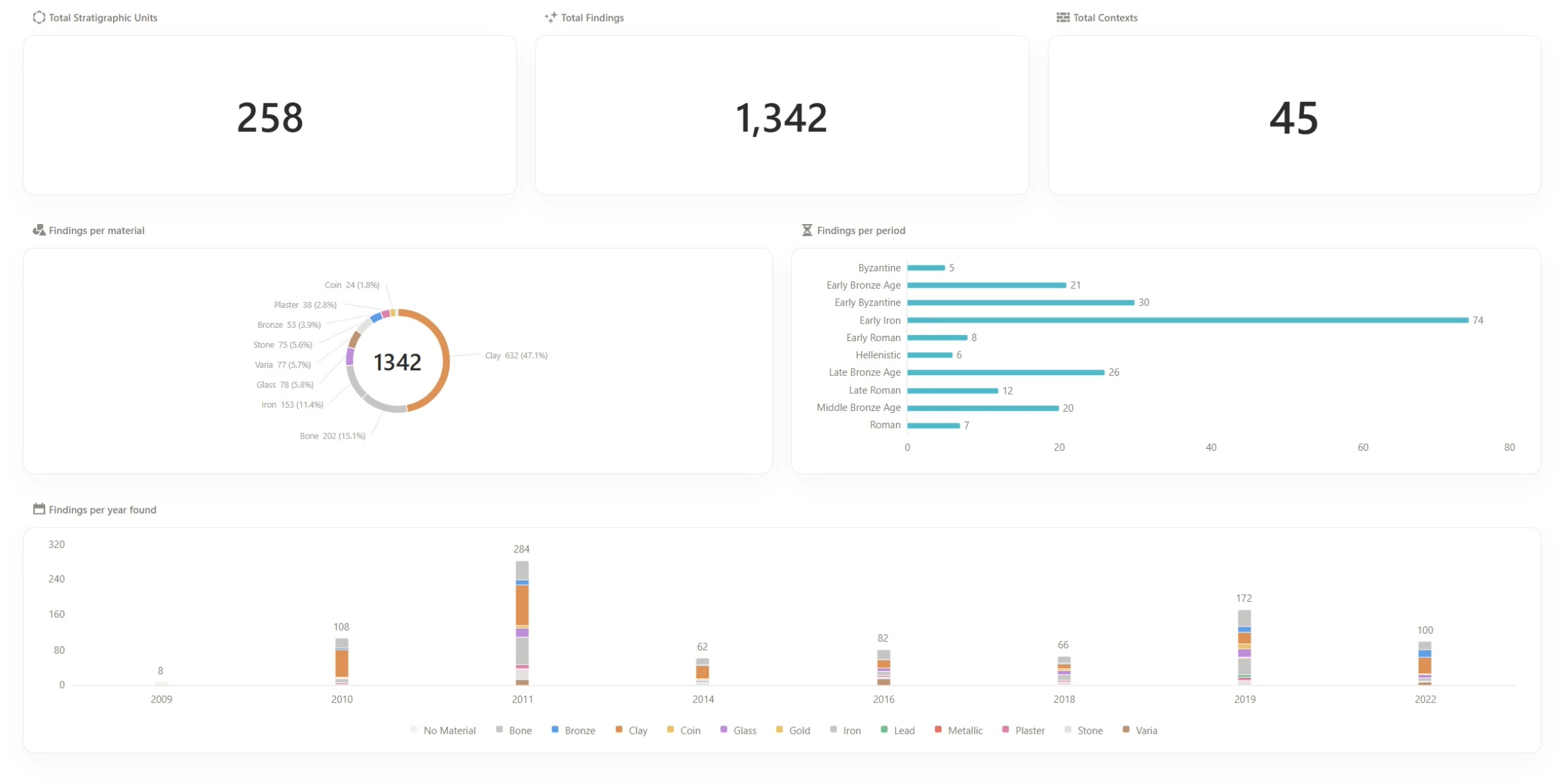
Totals drawn live from the records the team fills in
A dashboard counts stratigraphic units, finds and contexts, and breaks them down by material, period and year found. It updates as the team adds records, with nothing to recount at the end of the season.
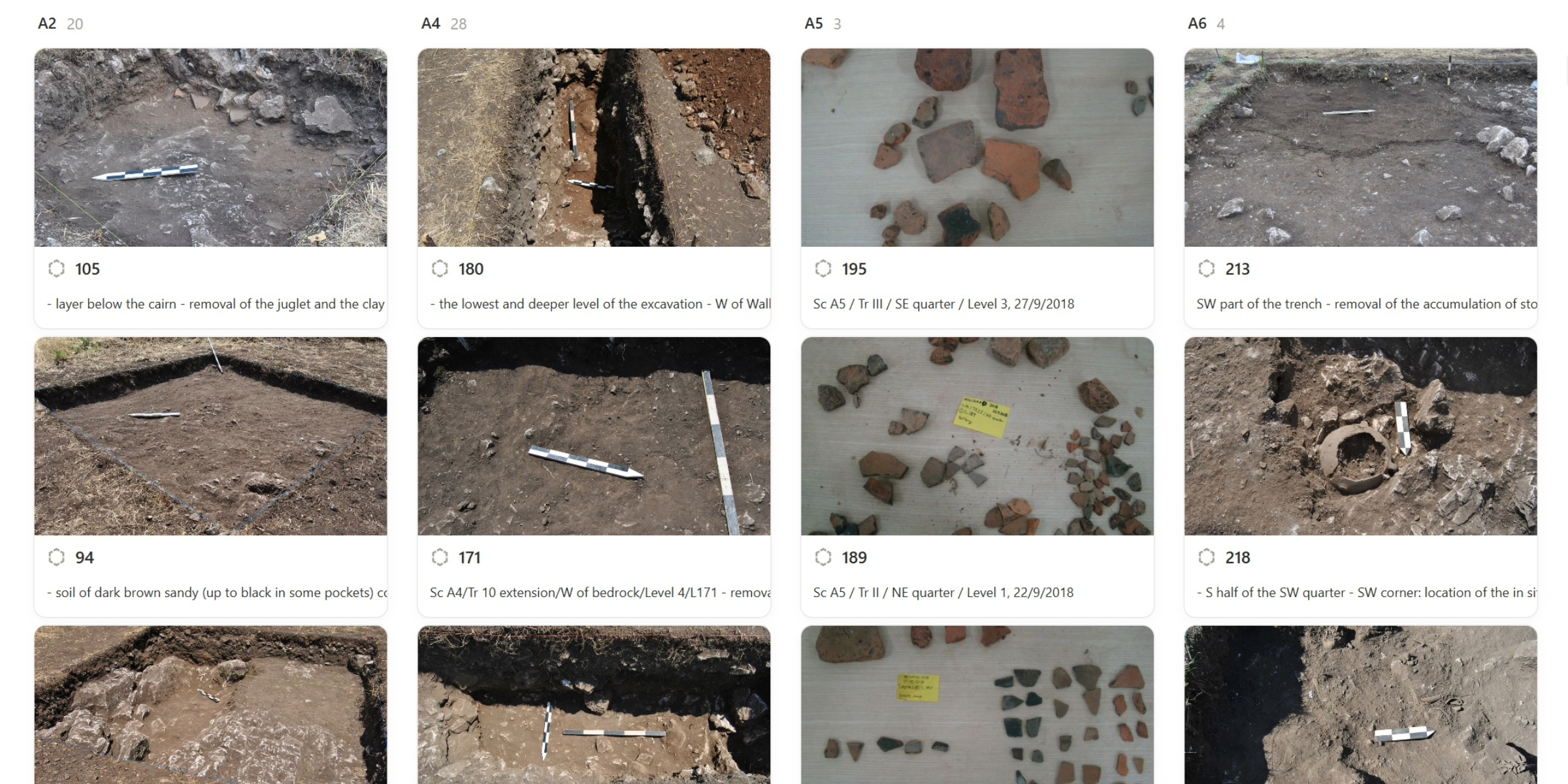
Stratigraphic units as the team recorded them, sector by sector
Each card carries the unit's field photograph, its number and a line on what was removed, grouped under the sector it belongs to.
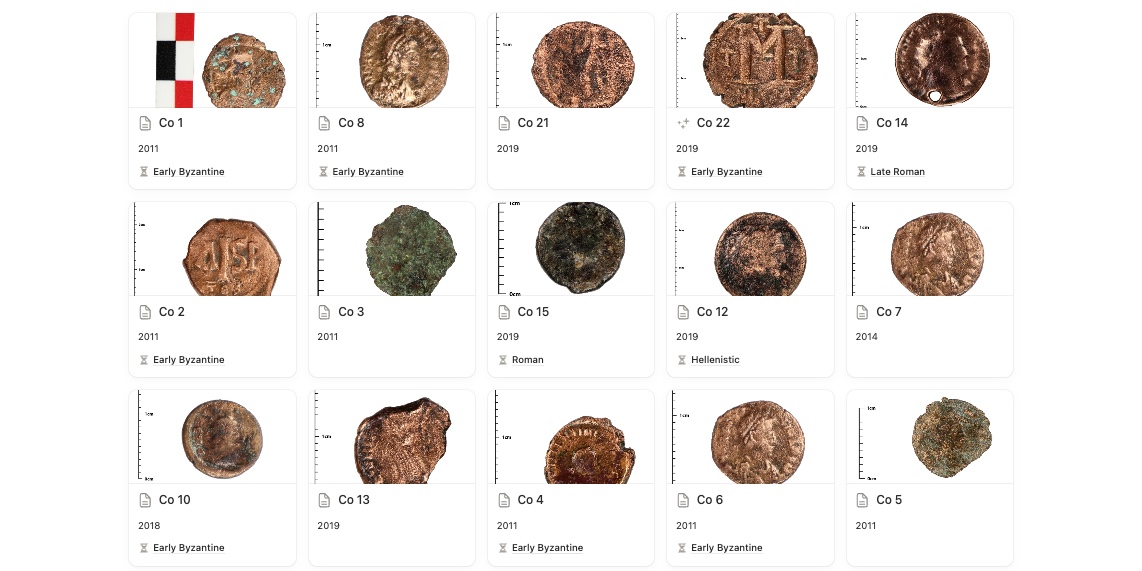
The same records, arranged for whoever is looking
One database, many views: a gallery of photographs for the finds specialist, a table for the registrar, a board for the director. Each view filters and groups the same records without copying them.
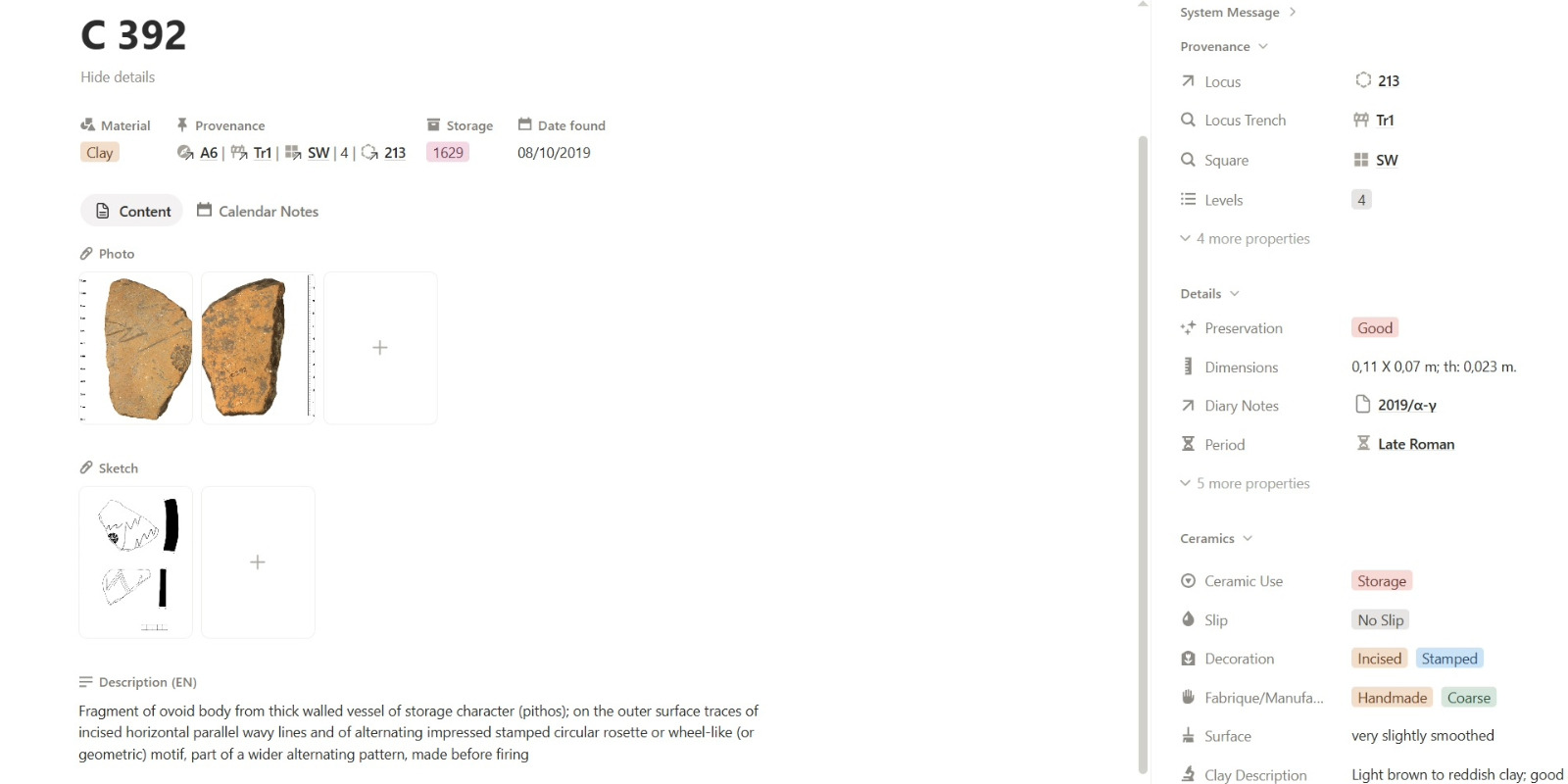
Everything about a find on one page, each field linked to its unit, trench and box
Photographs, drawings, provenance, the storage box and the specialist analysis sit on the find's own record, and every link leads to the record it names.
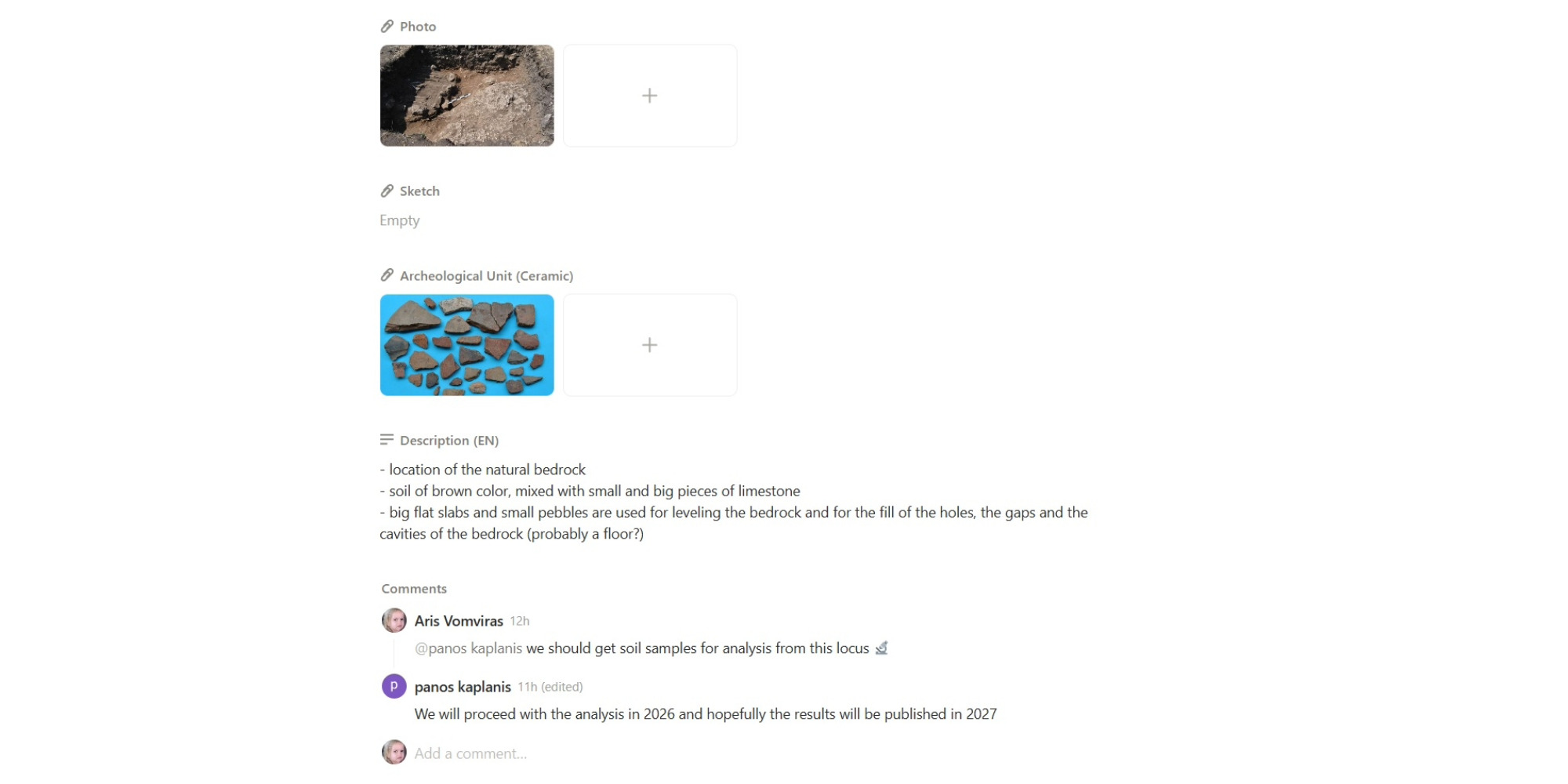
The team's questions and decisions stay on the record they are about
Questions are asked and settled in comments on the unit or find itself, so a decision made in the trench is still there when the report is written.
Getting set up
We move you in, and stay while you settle
Adopting a way of recording is the hard part, not the software. We bring your data across and stay with your team until recording in it is faster than what you did before.